צפייה בעגלת הקניות
0
Products
Sydney Dedicated Servers
Melbourne Dedicated Servers
Perth Dedicated Servers
Adelaide Dedicated Servers
Brisbane Dedicated Servers
Auckland Dedicated Servers
Singapore Dedicated Servers
Tokyo Dedicated Servers
Hong Kong Dedicated Servers
Los Angeles Dedicated Servers
New York Dedicated Servers
Ashburn Dedicated Servers
Dallas Dedicated Servers
Miami Dedicated Servers
Chicago Dedicated Servers
Seattle Dedicated Servers
Amsterdam Dedicated Servers
Frankfurt Dedicated Servers
London Dedicated Servers
Paris Dedicated Servers
Milan Dedicated Servers
Warsaw Dedicated Servers
Atlanta Dedicated Servers
דומיינים
רישום דומיין חדש
העברת דומיין אלינו
פניות ומידע
צרו קשר
-----
מאגר מידע
הרשמה
התחברות
How to setup your server for the first time
פורטל ראשי
מאגר מידע
Game Servers
Project Zomboid
How to setup your server for the first time
פניות ומידע
פניות השירות שלכם
הודעות וחדשות
מאגר מידע
הורדות
מצב הרשת
פתיחת פנייה
The following basic guide will show you how to setup your Project Zomboid server for the first time
Step 1:
Log into your game panel
Step 2:
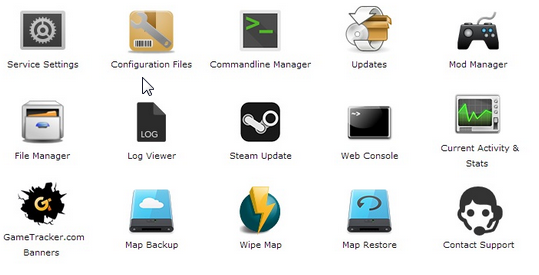
Select 'Web Console' from the icons
Step 3:
Once in the Web Console you will be prompted for a admin password. Enter a password you can remember
Step 4:
Your service should now be ready to join and use
?האם התשובה שקיבלתם הייתה מועילה
10 משתמשים שמצאו מאמר זה מועיל (32 הצבעות)
כן
לא
Go Dedicated uses cookies to provide a tailored experience on our website.
Learn more
המשך
מחולל סיסמאות
אנא הזינו מספר בין 8 ל 64 עבור אורך הסיסמה המבוקש.
אורך סיסמה
הסיסמה שהופקה
הפקת סיסמה חדשה
העתקה