Потрошувачка кошничка
0
Products
Sydney Dedicated Servers
Melbourne Dedicated Servers
Perth Dedicated Servers
Adelaide Dedicated Servers
Brisbane Dedicated Servers
Auckland Dedicated Servers
Singapore Dedicated Servers
Tokyo Dedicated Servers
Hong Kong Dedicated Servers
Los Angeles Dedicated Servers
New York Dedicated Servers
Ashburn Dedicated Servers
Dallas Dedicated Servers
Miami Dedicated Servers
Chicago Dedicated Servers
Seattle Dedicated Servers
Amsterdam Dedicated Servers
Frankfurt Dedicated Servers
London Dedicated Servers
Paris Dedicated Servers
Milan Dedicated Servers
Warsaw Dedicated Servers
Atlanta Dedicated Servers
Домени
Регистрација на домени
Трансфер на домени
Поддршка
Контакт
-----
База на знаења
Креирај профил
Најава на профил
How to setup your server for the first time
Почетна
База на знаења
Game Servers
Project Zomboid
How to setup your server for the first time
Поддршка
Тикети за поддршка
Акции и промоции
База на знаења
Превземања
Статус на сервери
Контакт
The following basic guide will show you how to setup your Project Zomboid server for the first time
Step 1:
Log into your game panel
Step 2:
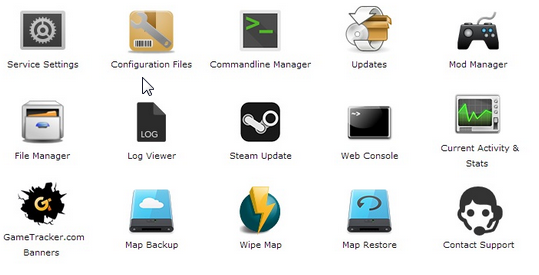
Select 'Web Console' from the icons
Step 3:
Once in the Web Console you will be prompted for a admin password. Enter a password you can remember
Step 4:
Your service should now be ready to join and use
Дали Ви помогна овој одговор?
10 Корисниците го најдоа ова како корисно (32 Гласови)
ДА
НЕ
Go Dedicated uses cookies to provide a tailored experience on our website.
Learn more
Преглед на тикет
Генерирај лозинка
Ве молиме внесете број помеѓу 8 и 64 за должината на лозинката
Должина на лозинка
Генерирана лозинка
Генерирајте нова лозинка
Копирај